
21 Casino App: Mobile Gaming On the Go

Mobile gaming has transformed how players access their favourite casino games. The 21 Casino app brings the full casino experience to your smartphone or tablet, allowing you to play anytime, anywhere. Whether you're commuting, relaxing at home, or taking a break, the mobile platform puts hundreds of games at your fingertips.
You can download the native app from official stores or access the mobile-optimised browser version instantly without installation.
App Details
|
Feature |
Details |
|---|---|
|
iOS Availability |
App Store download |
|
Android Availability |
Google Play and APK download |
|
Browser Version |
Yes, instant play |
|
Registration Required |
Yes, 18+ verification |
|
Game Categories |
Slots, table games, live casino |
|
Payment Options |
Multiple methods available |
|
Customer Support |
In-app messaging available |
How to Download the 21 Casino App








Getting started with mobile gaming takes just a few minutes. You have multiple options depending on your device type and preference. Native apps offer the best performance with features like home screen icons and optimised loading times, while the browser version provides instant access without installation.
Before downloading, ensure your device meets the minimum system requirements and has sufficient storage space. Check your internet connection stability for smooth downloads and gameplay.
Download iOS App
-
Open the App Store on your iPhone or iPad
-
Search for "21 Casino" in the search bar
-
Tap the download button and authenticate with Face ID, Touch ID, or your Apple ID password
-
Wait for the installation to complete
-
Open the app and log in with your existing account or register a new one
-
Allow necessary permissions when prompted for optimal functionality
The iOS app requires iOS 11.0 or later and works on iPhone, iPad, and iPod touch devices. Download times vary based on your internet speed but complete within 2-5 minutes.
Download APK
-
Visit the official 21 Casino website using your Android browser
-
Navigate to the mobile section or look for the Android download link
-
Enable "Install from Unknown Sources" in your device settings if downloading APK directly
-
Download the APK file and open it once complete
-
Follow the installation prompts
-
Launch the app and sign in or create your account
Alternatively, check Google Play Store for the official app listing. Android apps require version 5.0 (Lollipop) or higher. The APK method allows installation even if the app isn't available in your region's Play Store, though always verify you're downloading from the official casino website.
Games Available on the App
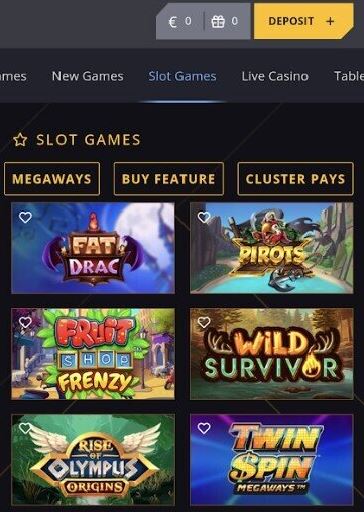
Mobile apps offer the full game library available on desktop versions. Slots form the largest category, with hundreds of titles ranging from classic three-reel games to modern video slots with multiple bonus features. Touch controls make spinning reels intuitive, and portrait mode works well for most slot games.
Table Section
Table games adapt well to mobile screens with adjusted layouts. Blackjack, roulette, baccarat, and poker variants use larger card and chip graphics for easy visibility. Some games offer landscape orientation for a more immersive experience on wider screens.
Live Casino
Live casino sections bring real-time dealer games to your mobile device. HD video streams adjust quality based on your connection speed, ensuring smooth gameplay without excessive buffering. Chat features let you interact with dealers and other players, maintaining the social aspect of casino gaming.
Banking for UK Players
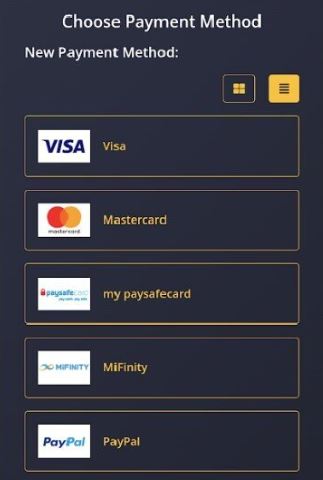
Managing your casino account through the mobile app includes full access to banking features. Deposit methods include:
-
Credit and debit cards (Visa, Mastercard)
-
E-wallets (PayPal, Skrill, Neteller)
-
Bank transfers
-
Prepaid cards
-
Cryptocurrency options (where available)
Deposits & Withdrawals
Deposits through the app process instantly using the same payment methods available on desktop. The interface simplifies the deposit process with saved payment methods, quick deposit buttons for common amounts, and fingerprint or face recognition for authentication.
Withdrawal requests submit directly through the app's cashier section. Processing times match desktop withdrawals, ranging from instant for e-wallets to 3-5 business days for bank transfers. The app lets you track withdrawal status and view transaction history for all account activity.
System Requirements and Compatibility
Casino apps require specific operating systems, storage capacity, and hardware performance to run smoothly. Meeting these requirements ensures stable gameplay, faster loading times, and access to all available features.
|
Category |
Requirements |
Details |
|
iOS devices |
iOS 11.0 or later |
Supports iPhone 5S and newer, iPad Air and newer, iPad mini 2 and newer, and recent iPod touch models |
|
iOS storage |
100-200 MB free space |
Additional space required for cached game data during use |
|
Android OS |
Android 5.0 (Lollipop) or later |
Some apps support Android 4.4 (KitKat), but performance may be limited |
|
Android storage |
150-250 MB free space |
Extra storage needed for updates and cached files |
|
RAM (Android) |
Minimum 2 GB |
Required for stable performance in graphics-intensive and live casino games |
|
Tablet compatibility |
Supported on iOS and Android tablets |
Interfaces adapt to larger screens; landscape mode improves table and live games |
|
Older devices |
Limited compatibility |
May experience slower performance or issues with newer game releases |
Security and Responsible Gambling
Mobile casino apps implement multiple security layers to protect your personal and financial information. SSL encryption secures all data transmitted between your device and casino servers, preventing interception by third parties. This encryption matches the security level used by online banking applications.
Biometric authentication adds an extra security layer beyond traditional passwords. Fingerprint and facial recognition prevent unauthorized access even if someone gains physical access to your device. You can enable or disable this feature through the app's security settings.
Available Tools
Responsible gambling tools within the app help you maintain control over your gaming activity. Set deposit limits, loss limits, and session time limits directly through the app's responsible gaming section. Self-exclusion options allow you to temporarily or permanently block access to your account if needed.
Responsible Gaming Note
Remember: You must be 18 or older to use this app. Gambling can be addictive. For support, contact:
-
BeGambleAware.org: 0808 8020 133
-
GamCare: 0808 8020 133
-
National Gambling Helpline: 0808 8020 133
Troubleshooting and App Support
|
Issue |
Cause |
Solution |
|
App crashes or freezes |
Temporary app error or corrupted cache |
Close the app and restart it. If the issue persists, clear the cache in device settings or reinstall the app |
|
Connection issues |
Unstable internet connection |
Switch between Wi-Fi and mobile data to identify the issue. Use a stronger connection for live casino games |
|
Login problems |
Forgotten password or unverified account |
Use the password reset function or verify your email. Contact support if access is still blocked |
|
App not updated |
Outdated app version |
Enable automatic updates or manually download the latest version from the official website (for APK users) |
|
Customer support delays |
High demand or limited support hours |
Use live chat for faster responses or check the FAQ section for common issues |
|
Battery drain |
High-performance graphics in games |
Lower screen brightness, close background apps, enable battery-saving mode, or play while charging |
Frequently Asked Questions
Is the 21 Casino app free to download?
Yes, downloading the app from the App Store or Google Play is completely free. You only need to deposit money if you want to play real-money games. The app also offers demo versions of many games for practice play without spending.
Can I play the same games on mobile as on desktop?
Most casino apps offer the full game library available on desktop versions. Some older games may not support mobile play due to outdated technology, but the vast majority of slots, table games, and live casino options work across all platforms.
Do I need to create a separate account for the mobile app?
No, you use the same account across all platforms. Log in with your existing username and password, and your balance, game history, and bonuses sync automatically between desktop and mobile.
How do I download the app if it's not in my app store?
Some regions restrict gambling apps in official stores. In these cases, download the APK file directly from the casino's official website for Android, or use the mobile browser version for iOS. Always verify you're downloading from the legitimate casino site to avoid security risks.
What should I do if games load slowly on the app?
Slow loading indicates connection issues or insufficient device resources. Close other apps running in the background, ensure you have a strong internet connection, and check that your device meets the minimum system requirements. Clearing the app cache or reinstalling may also help.
Can I deposit and withdraw money through the mobile app?
Yes, the app provides full banking functionality. You can deposit using all available payment methods, request withdrawals, and track transaction history. Processing times match desktop withdrawals, and the same minimum and maximum limits apply.
Does the app work on tablets?
Yes, both iOS and Android tablets support casino apps. The interface adapts to larger screens, providing an enhanced gaming experience suited to table games and live casino sessions. System requirements match smartphone versions.